Lamaz and I made deviantArt accounts. Please check them out and comment on our artwork!
Lamaz1928
El Llama
Thanks!
Read more on this article...
Monday, February 18, 2008


Saturday, January 26, 2008
IWarp Alien
I found this hilarious tutorial where you make yourself look like an alien using IWarp.
 Read more on this article...
 Read more on this article...

Tuesday, January 1, 2008
Tuesday, December 18, 2007
Great Color Chart
This is a really easy to find if you do a quick search, but I just fell in love with this chart!!! It tells you Hex codes and RGB codes for any color you want!
Link: Here Read more on this article...
Link: Here Read more on this article...
Monday, December 17, 2007
130 Ultimate Web 2.0 Gimp Gradients--SGlider12
Hey everyone! SGlider12 did the Gimp community a huge favor by converting all these Web 2.0 Gradients! Here's a link, and if you want to give thanks, visit her blog here!
Here's the Gimper.net topic for ya. Read more on this article...
Here's the Gimper.net topic for ya. Read more on this article...
How to Create Cool Signatures
A TUT on how to make a cool signature.
1. Open Gimspter (GIMP)
2. Go to File>New then change the width to 400 and the height to 150. (This is the requirements for most forums)
3. (optional, but if u add it, it looks supa cool) This feature is called flames. It adds affect to almost everything. But who knows, maybe it just to cool for you. To add flames go to
Filters>Render>Nature>Flame.
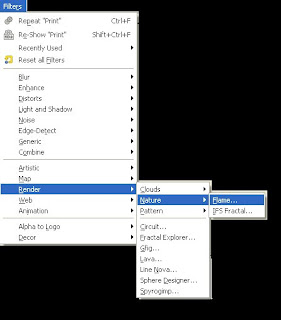 4. Now you should see a screen pop-up.
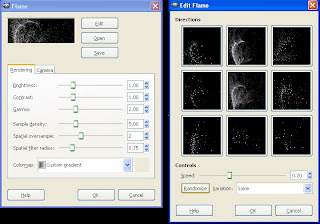 Pick a flame you like by hitting randomize. Once you have picked a flame you like, change the camera angle by hitting the camera tab. Adjust zoom, X, or Y.
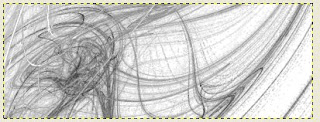
5. It may take a wile to load your flame if your signature is big, so be patient. Once its loaded, it should look similar to this.
 8. Yes its dul, but lets color it!!!! This is the fun part.....go to colors>colorize and choose your COLOR!!!!!!!!!!!!!!!
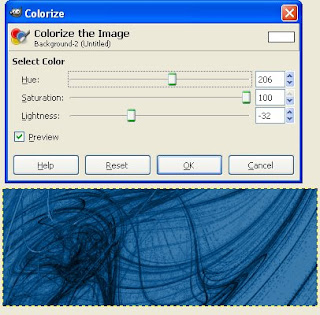 YAY!!!!
9. Now add a picture!!!!!! FUN!!!! To do this, pick a picture from google image or somewhere else and put it in a -NEW- gimp window. Edit it, and then paste it in your sig.
10. Ok, your done....simple sig. Here are a few products...

 Thanks for reading :D:D
Read more on this article...
Thanks for reading :D:D
Read more on this article...
1. Open Gimspter (GIMP)
2. Go to File>New then change the width to 400 and the height to 150. (This is the requirements for most forums)
3. (optional, but if u add it, it looks supa cool) This feature is called flames. It adds affect to almost everything. But who knows, maybe it just to cool for you. To add flames go to
Filters>Render>Nature>Flame.
 4. Now you should see a screen pop-up.
 Pick a flame you like by hitting randomize. Once you have picked a flame you like, change the camera angle by hitting the camera tab. Adjust zoom, X, or Y.
5. It may take a wile to load your flame if your signature is big, so be patient. Once its loaded, it should look similar to this.
 8. Yes its dul, but lets color it!!!! This is the fun part.....go to colors>colorize and choose your COLOR!!!!!!!!!!!!!!!
 YAY!!!!
9. Now add a picture!!!!!! FUN!!!! To do this, pick a picture from google image or somewhere else and put it in a -NEW- gimp window. Edit it, and then paste it in your sig.
10. Ok, your done....simple sig. Here are a few products...

 Thanks for reading :D:D
Read more on this article...
Thanks for reading :D:D
Read more on this article...
Subscribe to:
Posts (Atom)

 Posts
Posts